SOLA VIA

Solutions / Practical AI automation

Less repetitive work.
More clear thinking.

Start with one task your team knows well. Build a useful flow around it.

Explore what can change, what your team receives, and where a person stays involved.

A visual guide to our services

See the work.
Choose your starting point.

Open a scene, then choose a task to see a possible workflow.

Messages → organised records01 / AI AUTOMATION

Workflows

From scattered tasks to a connected flow.

Explore services
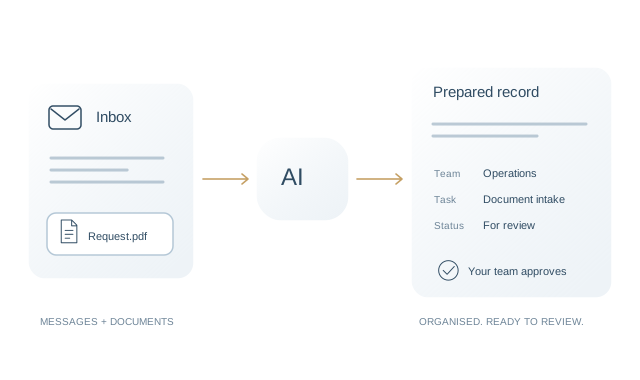
Messages → organised records

From incoming messages to one clear record.

InputAI + agreed rulesHuman review

Discuss this task ↗

Choose the handoff you want to simplify.

Idea → content → calendar02 / AI AUTOMATION

Content & marketing

From your expertise to a content workflow.

Explore services
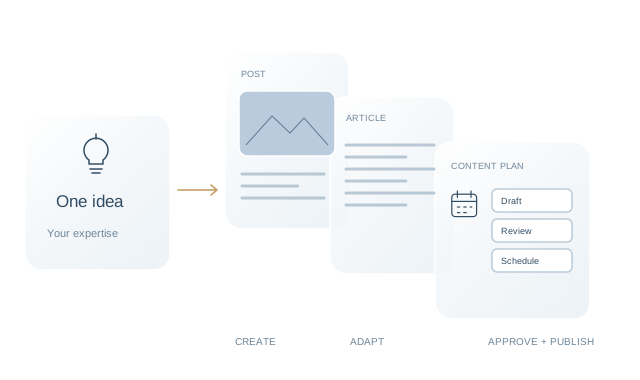
Idea → content → calendar

From your expertise to a content draft.

InputAI + agreed rulesHuman review

Discuss this task ↗

Choose a step in your content process.

Brief → slides + website03 / AI AUTOMATION

Business materials

From an agreed brief to something useful.

Explore services
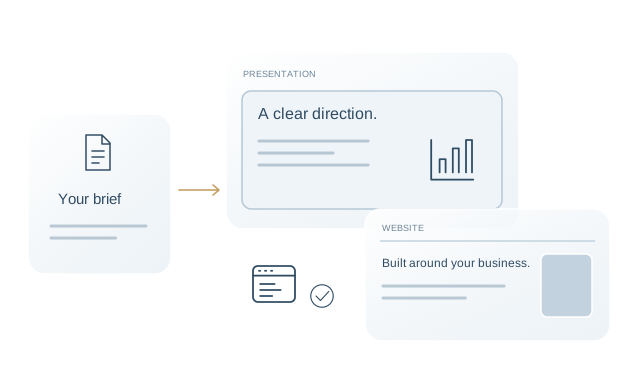
Brief → slides + website

From a brief to a presentation draft.

InputAI + agreed rulesHuman review

Discuss this task ↗

Choose what you need to create.

Demonstrations, not live AI tools or client results. Content is reviewed before publication. Connections and deliverables depend on the agreed scope.

The interactive examples use sample data and show possible workflows, not measured client results.

01 Customer enquiries

Every enquiry.
A clear next step.

Questions arrive in different places. Your team rereads messages, copies details, and works out who should respond.

What we automate
AI can identify the request and prepare a draft. Agreed rules organise the record and suggest a route.
What your team receives
One organised enquiry, with the original context and a draft ready to review.
Discuss customer enquiries

01What comes in

Team inboxDemo
Customer enquirySample incoming message

Help with document intake

Hello, could you help our operations team organise incoming documents before review?

Source message retained
Identify intent · organise details

02 / A request your team can act on

Prepared enquiryDemo
Draft record

Document intake

For review
TeamOperations
RequestExplore a workflow
Next stepConfirm the right owner
Draft reply

Could you tell us which tools your team uses today?

Your team confirms the owner and approves the reply.

02 Documents

The details you need.
Without the searching.

Important fields are buried in attachments. Someone has to find, copy, and compare them.

What we automate
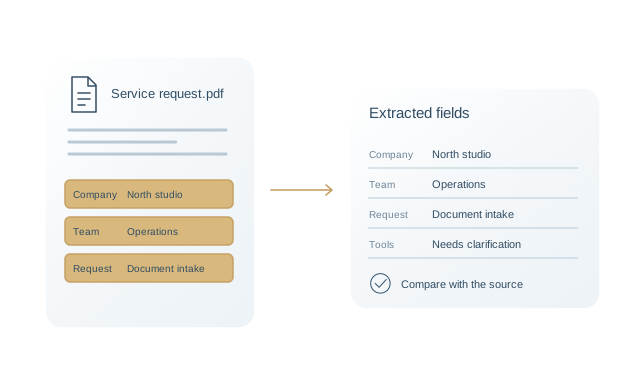
Extract agreed fields, organise them into a draft record, and flag missing or unclear information.
What your team receives
A structured draft with a link back to the source document.
Discuss documents

01What comes in

Source documentDemo
Service requestSample attachment
Request typeDocument intake
TeamOperations
Existing toolsNot provided
Extract fields · flag what is missing

02 / Details ready to verify

Extracted fieldsDemo
FieldPrepared value
Request typeDocument intake
TeamOperations
Existing toolsNeeds clarification
Compare with source attachment

Your team verifies the fields against the original document.

03 Reports

Bring the information
into focus.

Preparing a recurring update means collecting information from several tools and rewriting the same summary.

What we automate
Gather agreed information from available connections, organise it, and prepare a draft summary.
What your team receives
A consistent draft update that your team can check and share.
Discuss reports

01What comes in

Agreed sourcesDemo
Request recordsSelected fields
Team activityAgreed reporting period
Review notesBusiness context
Collect information · prepare a summary

02 / An overview to check

Draft reportDemo
Illustrative activity

A clearer overview.

Draft
Owner checks data and adds context.

Your team checks the data and approves the final report.

04 Follow-ups

Keep the next step
in sight.

Open requests and next actions sit across notes, inboxes, and task lists. It is easy to lose track.

What we automate
Use agreed status and date rules to prepare reminders and surface outstanding actions.
What your team receives
A clear list of what needs attention and who should review it.
Discuss follow-ups

01What comes in

Outstanding workDemo
Review incoming requestWaiting for team review
Open
Confirm next actionOwner to be agreed
Open
Capture request detailsPrepared for the team
Ready
Check status · surface the next action

02 / A reminder with context

Next-step overviewDemo
Agreed reminder rule

Review the next step.

Your team confirms the priority and any customer message.

Your team sets priorities and approves customer communication.

The connections behind the work

Information moves.
People stay in control.

  1. Your existing work

    Messages, documents and records from the sources we agree together.

  2. A connected workflow

    AI prepares information. Rules check the required steps and flag exceptions.

  3. Your team’s decision

    People review the result, add context, and approve what happens next.

Connections, access and compatibility are confirmed before implementation. Training helps your team use the system and recognise when to step in.

See the implementation process

See the details

What does one workflow look like?

Follow a sample enquiry from the inbox to a record ready for human review.

Explore the example

Your industry. Your workflow.

Start with a familiar situation.

Projects & business-case examples

See the task.
Understand what would change.

Two illustrative scenarios show how a workflow could change. The calculations are assumptions, not measured client results.

ILLUSTRATIVE SCENARIO · NOT A CLIENT CASESample document fields move from a PDF into a structured record

Document intake for a service business

Problem
A person repeatedly copies agreed fields from incoming documents.
Possible solution
Extract fields into a draft record, flag exceptions, and keep human verification.
Calculated illustration
300 documents/month × 5 minutes each = 25 hours of manual work. If 60% of that time is removed after review, the modelled saving is 15 hours/month.

All volumes, timings and improvement rates above are hypothetical inputs. Actual performance must be tested; no savings or payback are guaranteed.

ILLUSTRATIVE SCENARIO · NOT A CLIENT CASEA business idea becomes content drafts and a reviewed publishing plan

A content workflow for an agency or founder

Problem
Each post requires a new draft, platform adaptation and a manual handoff.
Possible solution
Use an agreed brief to prepare drafts and formats, followed by approval and supported scheduling.
Calculated illustration
12 posts/month × 90 minutes = 18 hours. At a hypothetical 35 minutes per post including review, the modelled saving is 11 hours/month.

These are illustrative assumptions, not measured client results. Platform costs and implementation effort are excluded.

BaselinePilot + quality checksMeasured outcome

For a real business case, agree the baseline, measurement period, review time, error rate, implementation cost and recurring costs. Time saved is not automatically cash saved; financial ROI requires those actual inputs.